Cosmos Screensaver Online
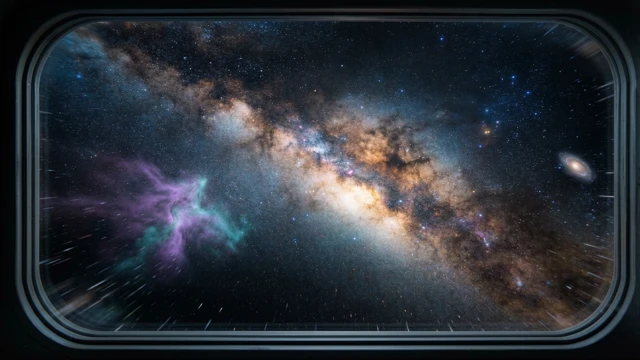
An endless flight through deep space — physically colored stars, drifting nebulae and faraway galaxies. Free, no install, no signup.
 Try it Free →
Features
Truly Infinite Flight
The camera cruises forward forever along a smoothly drifting course. The starfield wraps around the viewer, so there is no loading, no loop point, and no frame that ever repeats.
Physically Colored Stars
Spectral types are sampled at their real abundances — red dwarfs dominate, blue giants are rare — and every color comes from a blackbody temperature curve, with brightness falling off by the inverse square of distance.
Procedural Nebulae
Wispy gas clouds are generated live in the fragment shader with fractal noise. No textures, no downloads, and every cloud you drift through looks different.
Distant Galaxies
Tiny spiral and elliptical galaxies with a bright core, two logarithmic arms and a dust lane sit far in the background as a depth cue, barely moving as you pass.
Tune the Journey
Choose slow, medium or fast cruise, and slide star density, nebula thickness and course drift from a dead-straight run to a lazily weaving one.
Private and Free
Everything renders locally with WebGL. No account, no ads, no cost, and your settings never leave your browser.
How to Use
Open the screensaver
Load the page and the flight starts immediately. There is nothing to click, install or configure before the stars start streaming past.
Tap for a new heading
Click or tap anywhere and the ship picks a fresh random course and surges forward for a moment before easing back to cruise speed.
Adjust to taste
Tap the gear button in the bottom-right corner to set cruise speed, star density, nebula density, course drift and distant galaxies. Changes apply instantly.
Let it run
Go full screen and leave it. Your settings are remembered locally and the screen stays awake while the screensaver plays.
Frequently Asked Questions
What is the Cosmos screensaver?
Are the star colors realistic?
Does it ever loop or restart?
Do I need to install anything?
Will my settings be saved?
Does it work on phones and tablets?
Is it safe to leave on an OLED screen?
Privacy PolicyTermsCookiesDisclaimerContactPressScreensaver Knowledge