Matrix Code Rain Screensaver
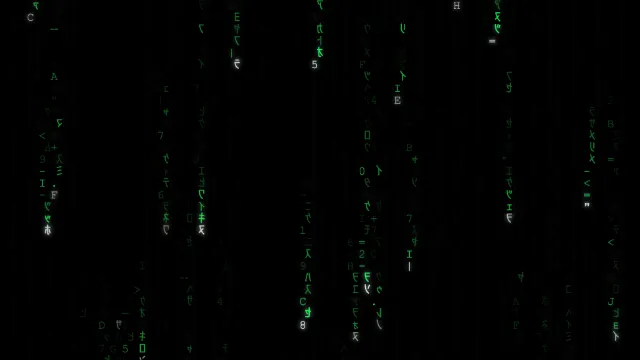
The green digital rain from The Matrix, running full screen in your browser. Free, no install, no signup.
 免费使用 →
功能特性
Authentic Digital Rain
Half-width katakana, digits and symbols pour down a pure black screen in independent columns, each with its own speed, trail length and start delay, so the rain never falls in step.
Glowing Head, Fading Tail
The leading glyph of every column burns near-white with a soft halo, the next few stay bright, and the rest dim away down the trail exactly like the film.
Glyphs That Keep Mutating
Characters already on screen flicker and swap themselves out at random, and every so often one flashes white for a moment before settling back.
Four Palettes Plus Any Color
Classic green, deep cyan, amber CRT or cool white — or open the color wheel and dial in any shade you like.
Your Own Characters
Switch between kana, binary, Latin letters and symbols, or type your own characters. Enter a phrase and it will quietly drop down one column, in order, as a hidden message.
Tap for a Shockwave
Touch or click anywhere and the columns around that point surge forward and flare brighter for a moment before easing back.
使用方法
Open and watch
The rain starts falling the moment the page loads. There is nothing to install, sign up for, or configure first.
Tap the screen
Click or tap anywhere to send a shockwave through the rain. The nearby columns speed up and brighten, then settle back within a second.
Make it yours
Tap the gear button in the bottom-right corner to set fall speed, glyph size, trail length, color and character set. Your choices are remembered for next time.